 Glyami
A shopping list that knows the glycemic index
Tap what you need, the list sorts itself in the same order as the shop, and each food carries its estimated GI. Nothing to type, no account.
Free, no account, no ads. French, Arabic, English, Spanish.
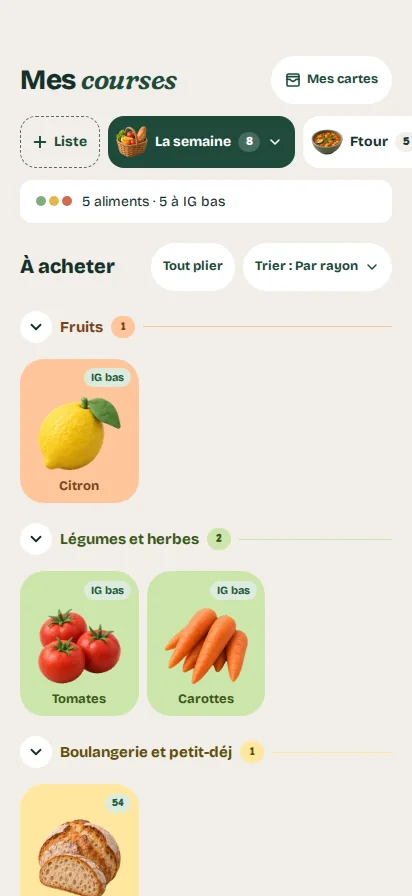
App screens shown in French.
Try it: tap what you need
On your list: 2What the list does

Tiles to tap, not lines to type
More than 500 illustrated foods and household items, sorted into 24 aisles, from fruit to cleaning products. Tap a tile to add it, tap again to remove it. A long press sets the quantity, the kind or a detail: organic, loose, large size.

The estimated GI next to each food
Each food carries a badge: low, medium or high GI. Foods with almost no carbohydrates, such as eggs or olive oil, are marked “no GI”. At the top of the list, one line sums it up: “5 foods · 5 low GI”.

In the order of the shop
Sort the list by aisle, in the order you added things, or from A to Z. In the shop, tap what you pick up: the item moves to the trolley. Empty the trolley when your shopping is done.
Several lists, plus Pépin's
One list for the week, one for a festive meal, one for the pantry. Pépin offers ready-made ones: Low-GI breakfast, Pantry basics, Light iftar, Salads of the week.

Easier with two
Send what is left to buy by message, or show a code: the other phone scans it with Glyami and receives the list. The code holds the list, nothing else.

Straight from the aisle to the list
Scan several products in a row: each one goes on your list. Like a meal idea? Its ingredients go on the list in one tap. And what you often buy comes back by itself under “My purchases”.
The GI values shown are estimates, taken from published tables. How Pépin calculates →

Everything stays on your phone
Your lists, your purchases and your loyalty cards stay on your phone. Nothing leaves it, except the list you choose to send. Read the privacy policy
Frequently asked questions
Do I need an account to share a list?
No. You send the list by message, or show a code that the other phone scans with Glyami. Only the items left to buy are sent.
Where do the GI values in the list come from?
They are estimates taken from published tables, for the food in general rather than a specific brand. The Method page explains the calculation and its limits.
Can I add an item that is not in Glyami?
Yes. Type its name, choose its aisle, and it joins your list like any other.
Does the list work offline?
Yes for the tiles: the catalogue is inside the app. Only scanning a product needs a connection.
Ready for your next shop?
Coming soon on Google PlayGlyami is a nutrition information tool. It is not a medical device: the app does not diagnose and does not replace the advice of a healthcare professional.
← Back to home